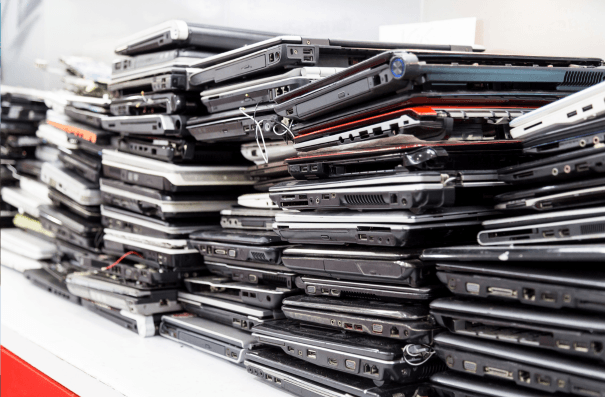

When companies replace computers, servers, mobile devices, and networking equipment, retired technology often ends up in a storage room, warehouse, or office corner. It may seem harmless to keep these devices until someone decides what to do with them. However, leaving retired IT equipment unused for months can create financial, operational, and security risks.
What are the hidden costs of storing retired IT equipment? Storing retired IT equipment for too long can cost businesses money through declining resale values, additional storage and handling expenses, inventory management challenges, and increased data security risks. Computers, servers, and mobile devices may lose market value while sitting unused, even if they remain suitable for refurbishment or resale. A proactive IT asset recovery program helps organizations recover eligible asset value, maintain data security, and reduce unnecessary electronic waste.
What Is IT Asset Disposition (ITAD)?
IT asset disposition (ITAD) is the structured process of managing retired IT equipment securely and responsibly. It typically includes asset collection, inventory tracking, data sanitization, equipment evaluation, refurbishment, resale, and responsible recycling.
A comprehensive ITAD program helps organizations protect sensitive information, recover financial value from eligible equipment, and reduce electronic waste.
Rather than treating equipment retirement as a separate task to address after a technology refresh, businesses should incorporate asset recovery into their regular IT lifecycle management processes.
Here's why delaying IT asset disposition can become more expensive than expected.
1. How Does Delaying IT Asset Disposition Affect Resale Value?
One of the biggest financial consequences of delaying asset recovery is the potential loss of resale value.
Corporate technology depreciates quickly. New hardware generations, changing software requirements, and shifts in secondary-market demand can reduce the value of equipment that was still marketable when it was first retired.
Consider a company replacing several hundred employee laptops. Many of those devices may still have desirable specifications and be suitable for refurbishment and resale. However, if they remain in storage for another six or twelve months, newer models may enter the secondary market, reducing demand for the older equipment.
The same applies to servers, networking equipment, and mobile devices.
What Factors Influence the Resale Value of Retired IT Equipment?
Several factors determine whether retired technology retains financial value:
- Age and specifications: Newer models and desirable hardware configurations generally have stronger resale potential.
- Physical condition: Damaged devices or equipment with missing components may require additional processing.
- Market demand: Demand for particular models, processors, memory configurations, and storage capacities changes over time.
- Software and hardware compatibility: Older equipment may become less attractive as operating systems and business applications evolve.
- Processing costs: Testing, repairs, data sanitization, transportation, and refurbishment can affect the final recovery amount.
Equipment that could generate a financial return today may be worth considerably less after an extended period in storage.
When Should Businesses Sell Retired IT Equipment?
The best time to evaluate retired IT equipment for resale is as part of the technology refresh process, rather than months after devices have been removed from service.
Early evaluation allows businesses to identify equipment with remaining market value before changing market demand and hardware depreciation reduce recovery opportunities.
Organizations should therefore integrate asset disposition into their technology refresh schedules instead of treating it as a separate project to address later.
2. What Are the Hidden Storage Costs of Retired IT Equipment?
Retired equipment does not disappear simply because it is no longer being used.
Laptops, monitors, servers, printers, networking hardware, and peripherals take up physical space. For organizations managing multiple offices, warehouses, or facilities, accumulated equipment can become a significant logistical problem.
Storage areas that could be used for active inventory, office operations, or other business activities instead become temporary holding areas for unused technology.
There are also operational costs to consider:
- Warehouse or facility space occupied by unused equipment.
- Labour required to move, organize, count, and relocate assets.
- Additional handling when equipment is transferred between locations.
- Administrative time spent maintaining records of assets no longer in service.
- Costs associated with managing equipment that has no realistic recovery potential.
These expenses are often not recorded as part of an organization's IT disposal budget. However, they contribute to the overall cost of delaying asset disposition.
How Can Businesses Calculate the Cost of Storing Retired IT Equipment?
Organizations can estimate their storage-related expenses by accounting for four main cost categories:
- Space costs: The portion of warehouse or facility space occupied by unused equipment.
- Labour costs: Employee time spent organizing, moving, counting, and managing stored assets.
- Handling costs: Expenses associated with moving equipment between departments, facilities, or storage locations.
- Administrative costs: Time spent maintaining inventories, reconciling records, and coordinating equipment that is no longer in service.
A simple way to approach the calculation is:
Total Storage Cost = Space Costs + Labour Costs + Handling Costs + Administrative Costs
For example, an organization can estimate the monthly labour spent managing stored equipment and add the allocated facility costs and expenses associated with internal transfers.
This calculation helps businesses understand that unused IT equipment can create ongoing operational expenses even when no direct disposal charge appears on the budget.
A scheduled collection and recovery process can help reduce unnecessary storage and handling while creating a more predictable equipment retirement cycle.
3. What Data Security Risks Come From Storing Retired IT Equipment?
Retired technology can remain a security concern long after it has been disconnected from the corporate network.
Computers, servers, smartphones, printers, and storage devices may contain confidential business information, customer records, employee data, credentials, and other sensitive information.
Simply removing equipment from active use does not remove the information stored on it.
The longer devices remain in storage without a documented disposition process, the harder it may become to maintain clear accountability over their location, ownership, and handling.
Potential risks include:
- Unauthorized access to stored information.
- Missing or unaccounted-for devices.
- Incomplete asset inventories.
- Unclear responsibility for equipment stored across multiple facilities.
- Data exposure during internal transfers or eventual disposal.
How Can Businesses Protect Data on Retired IT Equipment?
Organizations should establish a consistent process for retiring data-bearing equipment.
This should include:
- Identifying and recording assets before collection.
- Restricting access to stored devices.
- Maintaining a documented chain of custody.
- Applying appropriate data sanitization methods.
- Retaining records of completed sanitization or physical destruction.
The National Institute of Standards and Technology (NIST) provides guidance in NIST Special Publication 800-88 Revision 2: Guidelines for Media Sanitization.
The publication provides guidance for organizations establishing media sanitization programs and selecting appropriate methods for different types of storage media and information sensitivity.
Read the official publication: NIST SP 800-88 Revision 2: Guidelines for Media Sanitization.
Using an appropriate data sanitization process helps organizations prepare eligible equipment for reuse or resale while protecting sensitive information.
Importantly, security procedures should apply whether equipment is being redeployed internally, refurbished, resold, or recycled.
4. How Does Delayed IT Asset Disposition Affect Asset Management?
Technology refreshes rarely happen all at once across an entire organization.
Different departments and locations may replace equipment at different times. Some assets may be stored temporarily for redeployment, while others are waiting for approval, collection, or final processing.
Without a centralized process, it becomes increasingly difficult to maintain accurate records.
For example, an organization may have several hundred retired devices distributed across multiple offices. Some may have been removed from the asset management system, others may still appear as active, and some may no longer have clear ownership records.
This creates additional work for IT and finance teams.
Why Is Asset Visibility Important During IT Equipment Disposal?
A structured retirement process should help businesses answer several basic questions:
- What equipment has been retired?
- Where is each asset currently located?
- Which devices still have resale or redeployment potential?
- Which assets require data sanitization or physical destruction?
- What happened to each asset after collection?
- What financial value was recovered?
Maintaining this information helps businesses reconcile their inventories, support internal audits, and make more informed decisions during future technology refreshes.
When evaluating an IT asset disposition provider, organizations should look for reporting capabilities that provide visibility throughout the process.
Useful documentation includes:
- Serialized asset inventories.
- Collection and chain-of-custody records.
- Data sanitization or destruction records.
- Final disposition reports.
- Financial recovery reports, where applicable.
Working with a service provider that offers asset-level tracking and disposition reporting can make this process considerably easier.
5. How Does IT Asset Recovery Support Corporate Sustainability Goals?
Keeping retired technology in storage does not contribute to a circular economy.
Equipment that remains functional could potentially be reused, refurbished, or resold, extending its useful life and reducing the need for new devices in the secondary market.
When equipment is left unprocessed for extended periods, it may become less suitable for refurbishment or resale. This can reduce the number of devices that could have been given another lifecycle.
A more effective approach prioritizes:
- Internal redeployment: Reuse equipment that still meets business requirements.
- Refurbishment and resale: Extend the useful life of suitable devices.
- Component recovery and responsible recycling: Process equipment that cannot be reused.
This approach helps keep products and materials in circulation for longer and reduces unnecessary electronic waste.
Can IT Asset Recovery Generate Carbon Credits?
Some asset recovery programs also offer opportunities to generate carbon credits through the refurbishment and resale of eligible equipment.
Green4Good IT's carbon credit offering is linked to its End-of-First-Life™ technology recovery program. The program quantifies avoided emissions associated with eligible refurbished IT equipment and registers credits through the Canadian Standards Association's CleanProjects™ Registry under ISO 14064-2 principles.
For organizations exploring this opportunity, it is important to distinguish between three separate activities:
- Equipment reuse: Extending the useful life of technology through redeployment, refurbishment, or resale.
- Avoided emissions calculations: Quantifying emissions avoided through eligible activities using an applicable methodology.
- Carbon credit registration: Registering eligible credits through the applicable program and verification requirements.
Reuse alone does not automatically establish a specific emissions reduction or guarantee credit eligibility.
Businesses should review the applicable methodology, verification documentation, and credit registration requirements when evaluating these opportunities.
For more information, see Carbon Credits 101 for IT Leaders.
6. How Can Businesses Improve Their IT Asset Recovery Process?
Avoiding unnecessary storage costs and protecting the value of retired equipment starts with planning.
Rather than waiting until storage areas become full, organizations can integrate disposition activities into their regular technology lifecycle management processes.
Here are five practical steps businesses can follow.
Step 1: Identify Equipment Before the Technology Refresh
Start planning asset retirement before new equipment is deployed.
Identify which devices will be replaced, estimate collection volumes, and determine whether any assets may be suitable for internal redeployment.
This allows IT and procurement teams to coordinate the retirement process alongside new equipment deployment.
Step 2: Maintain an Accurate Asset Inventory
Record relevant information for each retired device, including asset tags, serial numbers, equipment type, specifications, location, and condition.
Accurate records help organizations identify missing assets, estimate recovery potential, and reconcile equipment during collection and processing.
Step 3: Establish Data Security Requirements
Determine which devices contain data and establish the appropriate sanitization or destruction procedures.
Ensure that the process includes documented handling, verification, and reporting.
Step 4: Evaluate Assets for Financial Recovery
Do not automatically send all retired equipment for recycling.
Assess whether devices can be redeployed, refurbished, or resold. Consider equipment condition, market demand, and the costs associated with processing.
An experienced asset recovery provider can help identify which assets have remaining market value and which are better suited to responsible recycling.
Step 5: Schedule Regular Collections and Review Results
Establish a predictable collection schedule based on the organization's technology refresh cycle and equipment volumes.
After processing, review asset-level reports, sanitization records, disposition outcomes, and any recovery proceeds.
Regular reporting helps organizations understand whether their retirement process is working efficiently and where improvements may be possible.
How Green4Good Helps Businesses Recover Value From Retired IT Equipment
Retired technology should not become a permanent storage problem.
Green4Good IT helps organizations manage end-of-life technology through secure asset disposition, financial value recovery, and sustainability-focused programs.
Instead of treating every retired device as waste, Green4Good evaluates eligible equipment for refurbishment and resale while ensuring that assets requiring recycling or other end-of-life processing are handled appropriately.
Secure Asset Collection and Tracking
Green4Good provides asset collection and transportation services designed to maintain control over equipment throughout the disposition process.
Its published approach includes serial-number and asset-tag tracking, secure transportation, and data sanitization aligned with NIST guidance.
This helps organizations maintain visibility over retired equipment and obtain documentation of its processing and final disposition.
Financial Recovery From Eligible Equipment
Green4Good helps organizations identify opportunities to recover value from retired corporate technology.
Eligible assets can be evaluated for refurbishment and resale, with recovery potential influenced by specifications, condition, age, and market demand.
Rather than assuming that every device has the same value, an asset-level approach helps businesses identify realistic recovery opportunities.
Responsible Recycling and Circular Economy Practices
Equipment that cannot be economically refurbished or resold can be directed toward appropriate recycling and material recovery.
This supports a circular economy approach by prioritizing reuse where practical and reducing unnecessary electronic waste.
Carbon Credit Opportunities
Through its carbon credit offering, Green4Good connects eligible refurbished technology with an emissions avoidance methodology.
For organizations with sustainability objectives, this creates another opportunity to incorporate retired equipment into broader environmental initiatives, subject to program eligibility and documentation requirements.
Stop Letting Retired IT Equipment Lose Its Value
Keeping retired technology in storage may seem like a convenient temporary solution, but the costs can accumulate quickly.
Declining resale value, occupied storage space, additional handling, inventory discrepancies, and unresolved data security risks can all make delayed disposition more expensive than expected.
A proactive asset recovery strategy helps businesses address these challenges while identifying opportunities to recover financial value and extend equipment lifecycles.
Still storing retired IT equipment? Turn it into an opportunity with Green4Good.
From secure data sanitization and asset tracking to refurbishment, resale, and responsible recycling, Green4Good helps organizations manage retired technology while recovering value and supporting sustainability goals.
Contact Green4Good IT to discuss your next technology refresh and explore how to make your retired IT assets work harder for your business.
Frequently Asked Questions About Retired IT Equipment
What are the hidden costs of storing retired IT equipment?
Storing retired IT equipment can lead to declining resale value, additional storage and handling expenses, inventory management challenges, and data security risks. A timely asset recovery process helps businesses reduce these costs and recover value from eligible equipment.
Does retired IT equipment lose value while in storage?
Yes. Retired computers, servers, and mobile devices can lose resale value as newer models enter the market and demand for older equipment changes. Age, specifications, physical condition, and market demand all influence how much value businesses can recover.
What are the security risks of storing old computers and servers?
Retired computers and servers may still contain confidential business information, customer records, employee data, and login credentials. Without proper access controls, data sanitization, and documented tracking, businesses risk unauthorized access, missing devices, and potential data exposure.
Can businesses recover money from old IT equipment?
Yes. Eligible laptops, desktops, servers, mobile devices, and networking equipment can be refurbished and resold to recover financial value. The amount depends on equipment age, specifications, condition, market demand, and processing costs.
What should businesses do with retired IT equipment?
Businesses should inventory retired equipment, identify devices suitable for internal reuse, and establish appropriate data sanitization procedures. Eligible equipment can then be refurbished and resold, while devices that cannot be reused should be directed toward responsible recycling.
How can an IT asset recovery provider help businesses?
An IT asset recovery provider manages equipment collection, tracking, data sanitization, refurbishment, resale, and responsible recycling. Green4Good helps businesses maintain visibility over retired assets, protect sensitive information, and recover value from eligible equipment.
SHARE THIS POST